
Mage Space: The Free AI Image Generator Anyone Can Use
Mage Space: Free AI Image Generator Explained Simply
Have you ever wished you could turn your ideas into pictures just by typing words?
Imagine typing:
“A cute baby dragon eating ice cream in space.”
Then, only a few seconds later, a beautiful picture appears on your screen.
That’s exactly what Mage Space can do.
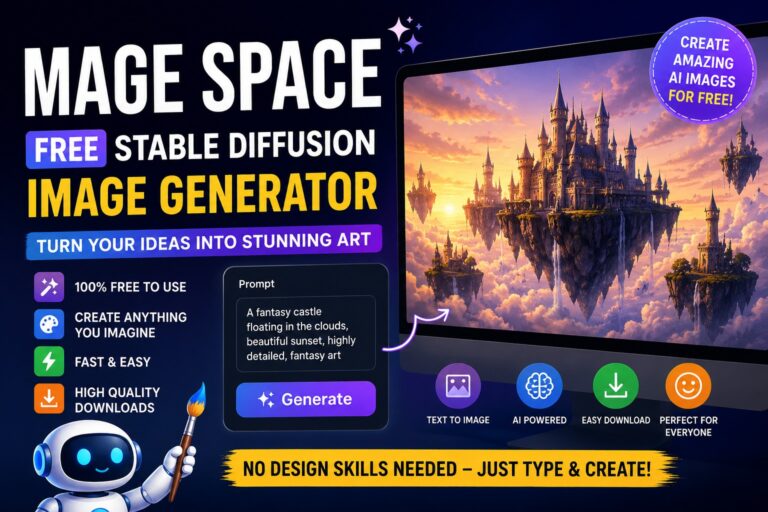
Mage Space is a free AI image generator that uses a powerful technology called Stable Diffusion to create pictures from text.
The best part?
You don’t need to know how to draw.
You don’t need expensive software.
You don’t even need design skills.
Just type what you imagine, and the AI creates it for you.


What Is Mage Space?
Mage Space is a website that allows people to create images using artificial intelligence (AI).
Think of it like a super-smart robot artist.
You tell the robot what you want, and it draws it for you.
For example:
- A flying unicorn
- A futuristic city
- A pirate cat
- A luxury sports car
- A fantasy castle
The AI reads your words and turns them into pictures.
What Is Stable Diffusion?
Stable Diffusion is the AI engine behind Mage Space.
Think of Stable Diffusion as the brain.
Mage Space is the website that lets you use that brain.
Stable Diffusion has learned from millions of images.
Because of this training, it understands what things look like.
When you type:
“A red apple on a wooden table”
The AI already knows:
- What an apple looks like
- What the color red looks like
- What a wooden table looks like
Then it combines all of those ideas into a brand-new image.

What Can You Create?
The possibilities are almost endless.
Animals
- Dogs
- Cats
- Lions
- Dragons
- Dinosaurs
Fantasy Art
- Wizards
- Elves
- Fairies
- Castles
- Magical forests
Business Graphics
- Logos
- Marketing images
- Website banners
- Product mockups
Social Media Content
- Instagram posts
- Facebook graphics
- YouTube thumbnails
Book Covers
Authors use AI to create:
- Novel covers
- Children’s books
- Coloring books
How Does Mage Space Work?
Using Mage Space is very simple.
Step 1: Visit the Website
Open Mage Space in your web browser.
Step 2: Type a Prompt
A prompt is simply a description.
Example:
“A happy puppy wearing sunglasses on a beach.”
Step 3: Click Generate
Press the generate button.
Step 4: Wait a Few Seconds
The AI starts creating your image.
Step 5: Download
If you like the image, save it to your device.
That’s it.
Why Do People Love Mage Space?
There are many AI image generators online.
But Mage Space is popular because it is:
Free
Many AI image tools charge money.
Mage Space lets beginners create images without spending much.
Easy To Use
You simply type what you want.
No complicated software.
No design experience.
Fast
Most images are generated within seconds.
Creative
You can create almost anything you can imagine.
Example Prompts For Beginners
Try these fun prompts:
Cute Animal
“A fluffy baby panda eating watermelon, cartoon style”
Space Adventure
“An astronaut riding a bicycle on the moon”
Fantasy World
“A magical castle floating in the clouds”
Funny Image
“A cat working in an office using a laptop”
Realistic Portrait
“A smiling young woman standing in a sunflower field, realistic photography”
Who Can Use Mage Space?
Mage Space is great for:
Students
Create school project images.
Teachers
Make educational graphics.
Bloggers
Create unique website images.
YouTubers
Design eye-catching thumbnails.
Small Business Owners
Create marketing graphics.
Kids
Have fun creating imaginative artwork.
Benefits of Using Mage Space
Saves Time
Instead of spending hours drawing, AI creates images in seconds.
Saves Money
You may not need to hire a designer for simple graphics.
Inspires Creativity
AI helps bring your imagination to life.
Beginner Friendly
Anyone can start creating immediately.

Tips For Better Results
Be Specific
Instead of:
“Dog”
Try:
“Golden Retriever puppy playing in a flower garden”
Add Style
Examples:
- Cartoon style
- Realistic photography
- Watercolor painting
- Anime style
- 3D render
Describe Lighting
Examples:
- Golden sunset
- Cinematic lighting
- Studio lighting
- Neon lights
The more details you give, the better the image usually becomes.
Is Mage Space Safe?
Mage Space is generally safe for learning and creative projects.
However:
- Children should use it with parental guidance.
- Users should follow the website’s rules.
- Always respect copyrights and community guidelines.
Are AI Images Perfect?
Not always.
Sometimes AI makes mistakes.
For example:
- Extra fingers
- Strange faces
- Odd backgrounds
If that happens, simply change your prompt and generate again.
Most users create several versions before finding the perfect image.
Final Thoughts
Mage Space is one of the easiest ways to create AI-generated images online.
Even if you’ve never designed anything before, you can create beautiful artwork simply by describing your ideas.
Whether you’re a student, blogger, YouTuber, entrepreneur, or just someone who loves creativity, Mage Space can help turn your imagination into pictures.
The future of art is becoming more accessible every day, and Mage Space is helping make that future available to everyone.
If you can imagine it, Mage Space can help you create it.