

The Complete Beginner's Guide to AI Study Guides, Research, Podcasts & Productivity
Introduction
Artificial Intelligence (AI) is changing how people learn, research, write, and work.
One of the most exciting AI tools available today is NotebookLM.
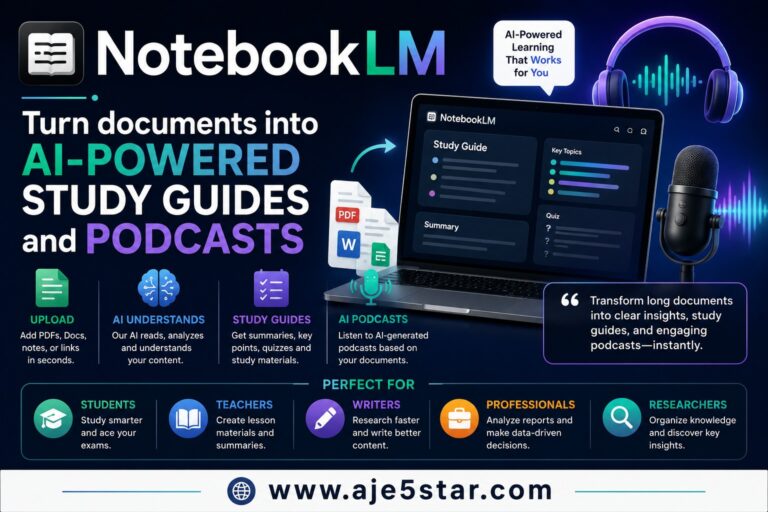
Created by Google, NotebookLM helps people turn documents, PDFs, articles, notes, research papers, and websites into easy-to-understand study guides, summaries, insights, and even AI-generated podcasts.
If you’ve ever felt overwhelmed by a large document, textbook, business report, or research paper, NotebookLM can help make learning easier.
This guide explains NotebookLM in simple language so that both beginners and experienced users can understand how it works and how it can help them.
By the end of this article, you’ll learn:
- What NotebookLM is
- How NotebookLM works
- Why do people use it
- How it helps with writing
- How it helps with brainstorming
- How it helps with coding
- How it helps with marketing
- How it helps with research
- How it helps with learning and studying

What Is NotebookLM?
NotebookLM is an AI-powered research and learning assistant developed by Google.
Think of it as your personal study partner.
Instead of searching the entire internet, NotebookLM focuses on the documents you provide.
You can upload:
- PDFs
- Research papers
- Business reports
- Google Docs
- Notes
- Articles
- Website content
- Textbooks
NotebookLM reads the information and helps you understand it faster.
It can answer questions, summarize content, generate study guides, and create podcast-style audio discussions based on your documents.
How Does NotebookLM Work?
Imagine having a personal tutor who reads every document you give them.
Whenever you ask a question, they instantly explain the answer.
That’s similar to how NotebookLM works.
You upload information.
NotebookLM:
- Reads it
- Organizes it
- Analyzes it
- Summarizes it
- Answers questions about it
This saves hours of reading and research.
AI-Powered Study Guides
One of NotebookLM’s most powerful features is creating study guides.
Many students struggle with large textbooks and course materials.
NotebookLM can turn hundreds of pages into easy-to-understand summaries.
Study guides may include:
- Key concepts
- Important facts
- Definitions
- Quiz questions
- Practice materials
- Chapter summaries
This makes learning faster and more efficient.
AI-Powered Podcasts
NotebookLM can transform documents into podcast-style audio conversations.
Imagine uploading a business report and having two AI hosts discuss it like a podcast.
This helps people learn while:
- Driving
- Exercising
- Walking
- Traveling
- Working
Instead of reading hundreds of pages, you can listen and learn.
This feature has become one of NotebookLM’s most popular tools.
Why Is NotebookLM Different?
Most AI tools search for general information.
NotebookLM focuses on your information.
This means it learns from the documents you upload.
Instead of asking:
“What is marketing?”
You can upload your marketing course material and ask:
“Explain chapter 4 in simple terms.”
NotebookLM uses your documents as its source.
This makes answers more accurate and relevant.
What Can NotebookLM Do?
NotebookLM can help with thousands of tasks.
Let’s explore the most useful ones.
NotebookLM for Research
Research often takes many hours.
NotebookLM helps simplify the process.
It can:
- Summarize reports
- Analyze research papers
- Extract important points
- Answer questions
- Compare information
Example
Upload a 100-page report and ask:
“What are the three most important findings?”
NotebookLM can provide a clear summary in seconds.
NotebookLM for Writing
Writers often need large amounts of information before creating content.
NotebookLM helps organize research and generate ideas.
It can assist with:
- Blog posts
- Articles
- Reports
- Newsletters
- Case studies
- Business documents
Example
Upload several articles about AI.
Ask:
“Create a blog outline based on these documents.”
NotebookLM can organize the information into a structured article.
NotebookLM for Brainstorming
Coming up with ideas can be difficult.
NotebookLM helps generate ideas based on uploaded materials.
It can create:
- Content ideas
- Business ideas
- Product ideas
- Marketing ideas
- Research topics
Example
Upload market research data.
Ask:
“What business opportunities exist in this industry?”
NotebookLM can identify trends and opportunities.
NotebookLM for Coding
Developers can use NotebookLM to understand technical documentation.
It can help:
- Explain code
- Summarize API documentation
- Organize programming notes
- Analyze technical reports
- Learn software development concepts
Example
Upload programming documentation.
Ask:
“Explain this API like I’m a beginner.”
NotebookLM can simplify complex technical information.
NotebookLM for Marketing
Marketing professionals often work with large amounts of information.
NotebookLM helps analyze:
- Customer feedback
- Market research
- Competitor reports
- Campaign performance
- Industry trends
Example
Upload customer reviews.
Ask:
“What are the most common customer complaints?”
NotebookLM can identify patterns quickly.
NotebookLM for SEO
SEO stands for Search Engine Optimization.
SEO helps websites rank higher on Google.
When people search:
- AI tools
- Make money online
- Website builders
- Digital marketing
Google determines which pages appear first.
NotebookLM can support SEO by helping content creators:
- Research topics
- Analyze competitors
- Organize content
- Create outlines
- Summarize keyword research
- Build authority content
Example
Upload competitor articles.
Ask:
“What topics are these articles missing?”
NotebookLM can help identify content gaps.
Who Uses NotebookLM?
Students
Students use NotebookLM for:
- Study guides
- Exam preparation
- Homework help
- Research summaries
Teachers
Teachers use NotebookLM to:
- Create learning materials
- Build lesson plans
- Summarize educational content
Bloggers
Bloggers use NotebookLM for:
- Content research
- Article planning
- SEO research
- Topic organization
Business Owners
Business owners use NotebookLM for:
- Market research
- Team knowledge management
- Strategic planning
- Report analysis
Researchers
Researchers use NotebookLM for:
- Literature reviews
- Research summaries
- Data analysis
- Knowledge organization
Can NotebookLM Help You Make Money?
Many people use NotebookLM to improve productivity and create business opportunities.
Examples include:
- Blogging
- Affiliate marketing
- Freelance writing
- Online courses
- Consulting
- Research services
- Content creation
NotebookLM doesn’t directly generate income, but it helps people work faster and make better decisions.
Advantages of NotebookLM
Excellent for Learning
Makes complex information easier to understand.
Saves Time
Processes large documents quickly.
Creates Study Guides
Generates learning materials automatically.
Generates Podcasts
Turns documents into audio discussions.
Great for Research
Organizes and analyzes information efficiently.
Easy to Use
No technical knowledge is required.
The Future of NotebookLM
AI learning assistants are becoming increasingly powerful.
Future versions of NotebookLM may offer:
- Better audio experiences
- More advanced research tools
- Improved collaboration
- Smarter study systems
- Enhanced knowledge management
Many experts believe AI-powered learning tools will become a standard part of education and business.
Limitations of NotebookLM
Like all AI tools, NotebookLM is not perfect.
Sometimes it may:
- Miss context
- Misinterpret information
- Provide incomplete summaries
- Depend on document quality
Always review important information yourself.

Tips for Better Results
Upload High-Quality Documents
Better source material usually produces better results.
Ask Specific Questions
Instead of asking:
“Summarize this.”
Ask:
“What are the five most important lessons from this report?”
Use Follow-Up Questions
Examples:
- Explain this simply
- Give examples
- Create quiz questions
- Turn this into a study guide

Final Thoughts
NotebookLM is one of the most innovative AI tools available today.
Its ability to transform documents into study guides, summaries, insights, and podcasts makes it unique among AI assistants.
Whether you’re a student, teacher, blogger, entrepreneur, marketer, developer, researcher, or complete beginner, NotebookLM can help you learn faster, organize information better, and save valuable time.
As AI continues to evolve, tools like NotebookLM are changing how people study, research, create content, and manage knowledge in the digital age.