Finding a job can be challenging, especially when you are applying for your first position or changing careers. One of the most important steps is creating a CV that clearly explains your skills, education, experience, and achievements.
The good news is that you do not need to pay a designer to create a professional CV. You can use free online tools and simple formatting techniques to prepare a document that employers can understand.
This guide explains how to create a professional CV for free in 2026, even if you have no work experience.
The Short Version
- Keep the layout simple, clean and easy to read.
- Tailor your summary and skills to each job description.
- With no experience, use education, projects, volunteering and training.
- Be honest. Never invent jobs, skills or certificates.
- Proofread, then save as a PDF unless the employer asks otherwise.
Table of Contents
- What is a CV?
- What makes a professional CV?
- Information to include in your CV
- Best free tools for creating a CV
- How to write a CV step by step
- CV example for someone with no experience
- Mistakes to avoid
- How to improve your chances of getting an interview
- Frequently asked questions
1. What is a CV?
A CV, or curriculum vitae, is a document that presents your education, skills, work experience, and relevant achievements.
Employers use it to understand whether your background matches a job vacancy.
Depending on the country and industry, the terms CV and resume may have different meanings. In many European countries, CV is the common term for a job application document.
A good CV should be:
- Easy to read.
- Accurate and honest.
- Relevant to the job.
- Clearly organized.
- Free from spelling mistakes.
- Focused on useful skills and achievements.
Your CV does not need complicated graphics or expensive design.
2. What makes a professional CV?
A professional CV helps an employer quickly understand what you can offer.
It should answer three basic questions:
- Who are you?
- What can you do?
- Why might you be suitable for this position?
A strong CV is not simply a list of everything you have ever done. It selects the information most relevant to the opportunity.
3. Information to include in your CV
Contact information
Include your:
- Full name.
- Professional email address.
- Phone number, if appropriate.
- City or general location.
- Professional portfolio or LinkedIn profile, if relevant.
Do not include sensitive personal information that the employer does not need.
Professional summary
Write two to four sentences describing your background, strongest skills, and career goals.
Example:
“Motivated entry-level digital marketing candidate with practical knowledge of social media content, basic SEO, and online research. Interested in helping businesses improve their online presence while continuing to develop professional marketing skills.”
Work experience
Include relevant jobs, internships, freelance work, volunteering, or practical projects.
For each entry, explain:
- Your job title or role.
- Organization or client, where appropriate.
- Dates.
- Main responsibilities.
- Results or achievements.
Use clear action words such as created, organized, supported, developed, managed, and improved.
Education
Include your school, college, university, qualification, and relevant dates.
If you are still studying, say so clearly.
Skills
Choose skills that match the job description.
Examples include:
- Communication.
- Customer service.
- Microsoft Office.
- Google Workspace.
- Social media management.
- Basic graphic design.
- Programming.
- Research and writing.
- Teamwork.
- Time management.
Only include skills you can honestly demonstrate.
Certificates and projects
Add relevant courses, certificates, personal projects, or volunteer work. These can be particularly helpful when you have limited formal employment experience.
4. Best free tools for creating a CV
Here are some useful tools to consider. Always check the current free-plan limits and whether downloading your chosen format requires payment.
1. Europass
Europass is an official European platform that helps people create and manage CVs and other career documents. It is especially useful for people applying for jobs, education, or training opportunities in Europe.
2. Canva
Canva offers CV and resume templates. Some designs and features are paid, so select a free template if you do not want to upgrade.
3. Google Docs
Google Docs can be used to write and format a CV. It is a practical choice if you prefer a simple document that you can edit and export.
4. Microsoft Word
Word provides document-writing features and resume templates, although access to some features may depend on your Microsoft plan.
5. LibreOffice Writer
LibreOffice Writer is a free, open-source desktop word processor that can be used to create and export CV documents.
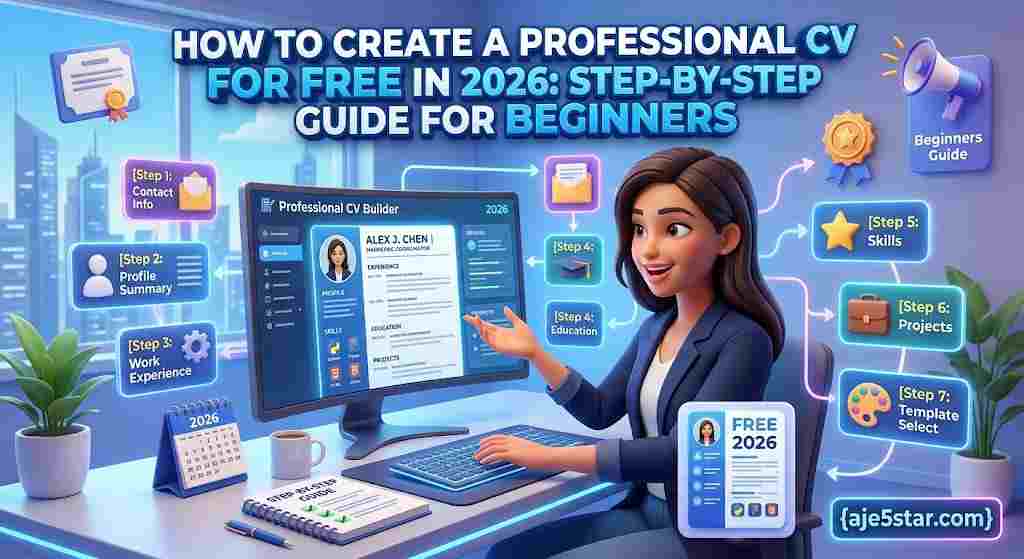
5. How to write a CV step by step
Step 1: Read the job description
Before writing, identify the skills, qualifications, and responsibilities mentioned in the vacancy.
Make a list of the requirements you genuinely meet.
Step 2: Choose a simple layout
Use a clean design with clear headings. Avoid unnecessary graphics, multiple columns, and decorative elements that make the document difficult to read.
Step 3: Write your professional summary
Explain your background and what you want to contribute. Avoid empty statements such as “I am the best person for this job.”
Give specific, truthful information instead.
Step 4: Add your relevant experience
Put your most recent relevant experience first. If you have no formal work history, use practical projects, volunteering, internships, and relevant responsibilities.
Step 5: Add education and skills
List qualifications and skills that are relevant to the position. Do not exaggerate your experience or claim certificates you have not earned.
Step 6: Review your CV
Check spelling, grammar, dates, contact details, and formatting.
Step 7: Export and save it
Save a copy in an appropriate format, usually PDF when the employer accepts it. Use a clear filename such as FirstName-LastName-CV.pdf.
Follow the employer’s instructions if they request a different format.
6. CV example for someone with no experience
You can use the following structure as a starting point.
YOUR FULL NAME
City, Country | Professional email | Phone number
PROFESSIONAL SUMMARY
Motivated and reliable entry-level candidate interested in developing a career in customer service and administration. Strong communication, organization, and computer skills. Willing to learn and contribute positively to a professional team.
EDUCATION
School or Institution Name
Qualification or Course
Year completed or expected completion date
SKILLS
- Communication and teamwork.
- Basic computer skills.
- Email and document preparation.
- Time management.
- Problem-solving.
- Willingness to learn.
PROJECTS AND VOLUNTEERING
Project or Organization Name
- Assisted with organizing activities.
- Communicated with team members.
- Completed assigned tasks within agreed deadlines.
CERTIFICATES AND TRAINING
Add relevant courses or certificates you have genuinely completed.
This is a basic example. Adjust the sections to match your experience and the position you want.
Before and After: Strengthening a CV Bullet
| Weak | Stronger |
|---|---|
| Helped with social media. | Created and scheduled weekly posts for a school club’s social media page. |
| Good at communication. | Answered customer questions in person and by email during a volunteer fundraising event. |
| Worked on a team project. | Collaborated with four classmates to research, design and present a group project on time. |
Only describe things you actually did, and add real numbers or results where you have them.
7. Common CV mistakes to avoid
Spelling and grammar mistakes: Read your CV carefully before sending it.
Using the same CV for every job: Adjust your summary and relevant skills to match each opportunity.
Including irrelevant information: Focus on what helps an employer understand your suitability.
Making unsupported claims: Do not invent employment history, qualifications, or achievements.
Using an unprofessional email address: Create an email address that uses your name or a simple professional variation.
Making the design too complicated: A clean, readable document is often better than a heavily decorated template.
Ignoring application instructions: Follow the employer’s requested file type, naming convention, and application process.
Final CV Checklist
| Check | Question to Ask |
|---|---|
| Relevance | Does it match the job description? |
| Accuracy | Are dates, names and contact details correct? |
| Honesty | Can I prove every claim if asked? |
| Clarity | Is it easy to scan in under a minute? |
| Language | Have I checked spelling and grammar? |
| Format | Is it saved in the format the employer asked for? |
| Privacy | Did I leave out unnecessary personal details? |
8. How to improve your chances of getting an interview
A good CV is only one part of a successful job application.
Tailor your application
Use the job description to decide which genuine skills and experiences deserve the most attention.
Build a portfolio
If you are applying for creative, technology, writing, or marketing roles, show examples of your work where appropriate.
Develop practical skills
Use free courses and tutorials to improve your knowledge. Add relevant completed projects to your CV.
Prepare a cover letter
A short, relevant cover letter can explain why you are interested in the role and how your experience relates to it.
Keep your CV updated
Add new qualifications, projects, and work experience as you develop.
9. Frequently asked questions
Can I create a professional CV for free?
Yes. You can use tools such as Google Docs, LibreOffice Writer, and free features of online CV builders to create a professional document without paying a designer.
What should I put on my CV if I have no experience?
Include your education, practical projects, volunteering, relevant skills, training, and achievements. Do not invent employment history.
How long should a CV be?
The appropriate length depends on your experience, profession, and country. For many early-career applicants, one or two focused pages are a practical starting point. Follow any employer-specific instructions.
Should I include a photo?
Photo expectations vary by country, industry, and employer. Check local application conventions and the vacancy instructions before adding one.
Should I save my CV as a PDF?
PDF is often a suitable format because it preserves layout across devices. However, follow the employer’s requested format if it specifies Word or another file type.
Is Europass free?
Europass provides free tools for creating and managing CVs and career information. Some external services linked from career platforms may have separate terms.
Conclusion
Creating a professional CV does not have to be expensive or complicated. With a clear structure, honest information, and a suitable free writing tool, you can prepare a document that presents your skills and experience professionally.
Start with a simple template, tailor your information to the job, and review every detail before applying.
Visit Aje5star.com for more free tools, beginner-friendly technology tutorials, online learning resources, and practical digital skills guides. Keep learning, keep improving, and take the next step in your career.